NordicTrack and iFit—Good idea, awful execution
Update 2:
My NordicTrack model no longer works with iFit! They require Bluetooth instead of WiFi. It took 3 hours of frustration to figure this out. Furthermore, iFit has a replacement part to fix this, and they never informed me, and the part is no longer available. So I have a treadmill with just boring workouts.
Update: (10 July 2017)
iFit seems to have finally gotten their act together. using my new iPad 10.5" tablet, pictures refresh at least every 4 seconds. It is more like a jerky movie. The iPad connects to the Live View much more quickly. And lately, the workout of the day has been more interesting.
However, there is still a fundamental problem with the iFit view of the walk: it only looks straight ahead, so most of the image is filled with the path, the road, or traffic. The views are on the sides! I eagerly did a walk around Volcanos National Park, but nary a volcano was in sight. iFit needs to have look left and look right options in its walk viewer. And today I walked to Iguazu Falls in Brazil, and exactly one iFit frame barely showed the Falls! The iFit trips need to be fixed so they look sideways, otherwise the walks are an example of bait and switch.
As part of my quest for fitness, I decided to purchase a treadmill. I bought a NordicTrac C1570PRO, which seemed to have what I needed:
- A long track (I am big)
- Good shock absorption (bad knees)
- A fan (to keep me cool)
- Decent audio
- And especially iFit (bought sight-unseen to reduce boredom)

First, let me say a few words about the treadmill itself. It comes in a HUGE, heavy box. Luckily I was able to pay the delivery man to help me get it into the house. It barely fit through the doors and the required turns, so you had best measure your house and ask NordicTrack for the box dimensions before ordering.
Second, you can see that it is broken in two places: the rear of the left standing strip, and the underneath piece of the right arm. Luckily it works without these pieces. NordicTrack is out of stock for the standing strip—NordicTrack said it will take a month to get the part, and weeks to ship. The underarm piece just arrived in a few days. The left standing platform arrived in 8 days. Not bed service. I hope I can install them.
While I am generally satisfied with the device, many things about both it and iFit are confusing. iFit and NordicTrack are part of the same company, so things are intertwined. The more expensive models (Mine cost $1300, which is not cheap) have an Android tablet built in to function as the display. There is also an iFit app in the Google Play Store. But it does not seem to work on any of my devices. The display on the treadmill truly sucks and is hard to read. However, today I found out that you can get into setup mode (hold Stop and then attach the key), and all the way at the bottom is a contrast adjustment that improves things dramatically. But why would they send it to me on such a dim setting?
Setting up the WiFi WPA2 password is truly painful. You must scroll back and forth through the alphabet (one press=one letter advance), and the display does not even scroll (so that 'a' is not next to 'z'). I have a 16-letter pass phrase, and this was really annoying—it took over 100 key presses. Also, NordicTrack's first support option is to tell you to redo the WiFi, which of course I refused to do. You can check whether the WiFi is working by logging into the Web page of the NordicTrack at its ip address from your computer.
On to iFit. The iFit Web site is truly the worst I have ever seen. Aside from a few instructional videos, there is no help whatsoever. It is also unclear what you get when you subscribe to iFit.
For example, they claim to have Android and iPad apps, and they do exist on the Play store (Android) but they do not work on any of my 3 Android devices including a Nexus 7 running KitKat. There is nothing very demanding in the iFit app, so there is no reason that it should not work with most devices. But I think that in fact it will only work on the higher-end treadmills (more than $1300!) that have an Android tablet built into them. However, this does not make sense because the app's main feature is that you can walk on a hike with it and turn your hike into an iFit workout. So I surmise.
iFit's response is to use the beta "LiveView" from their Web page. When it works, you get to view Google Street View pictures along your route. See below.

My 7" tablet is connected to the iFit Web Page and is in LiveView mode. You definitely want to use landscape mode on your viewing device. LiveView really does cut down on the boredom factor, so it is a winner when it works.
Getting into LiveFit mode is the first of many infelicities you are subjected to. They tell you to click the link next to your name. But, the link only appears after the workout has started! So you have to stand on the moving treadmill while you fiddle with your tablet—a safety issue in my opinion.
The second infelicity is that it is really, really difficult to schedule and select programs. You can ONLY run iFit programs that are scheduled for today.
When you select a program to run, there is a schedule tab. It schedules the workout at the end of all your other workouts. Of course this is totally dumb. Any reasonable program would ask you for the day on which to schedule this workout. But what if you have workouts scheduled into the far future and you want to run this new workout today? Then you have to use the iFit calendar. Often it takes up to a minute to load calendar view. Here is my November schedule:

Now, you can drag an event from one day to another, but what if the new event, which is scheduled at the end of all other events, is in December? If you are lucky, some November days appear in the December calendar and you can drag it to the end of November, return to the November calendar, and then drag it to today. Really cumbersome and annoying!
The next hurdle is selecting an event that is scheduled today. My NordicTrack manual says:
"To download an iFit workout in your schedule, press the iFit button to download the next workout in your schedule. Press Map, Train, or Lose Wt. button to download the next workout of that type in your schedule."
"To re-run a recent iFit workout from your schedule, press the Track button. Next press the increase and decrease buttons to select the desired workout. Then press Enter to start the workout"
Clear as mud. What is the difference between the Map, Train, or Lose Wt. buttons? When I press the Map button, I am often greeted with an error message:
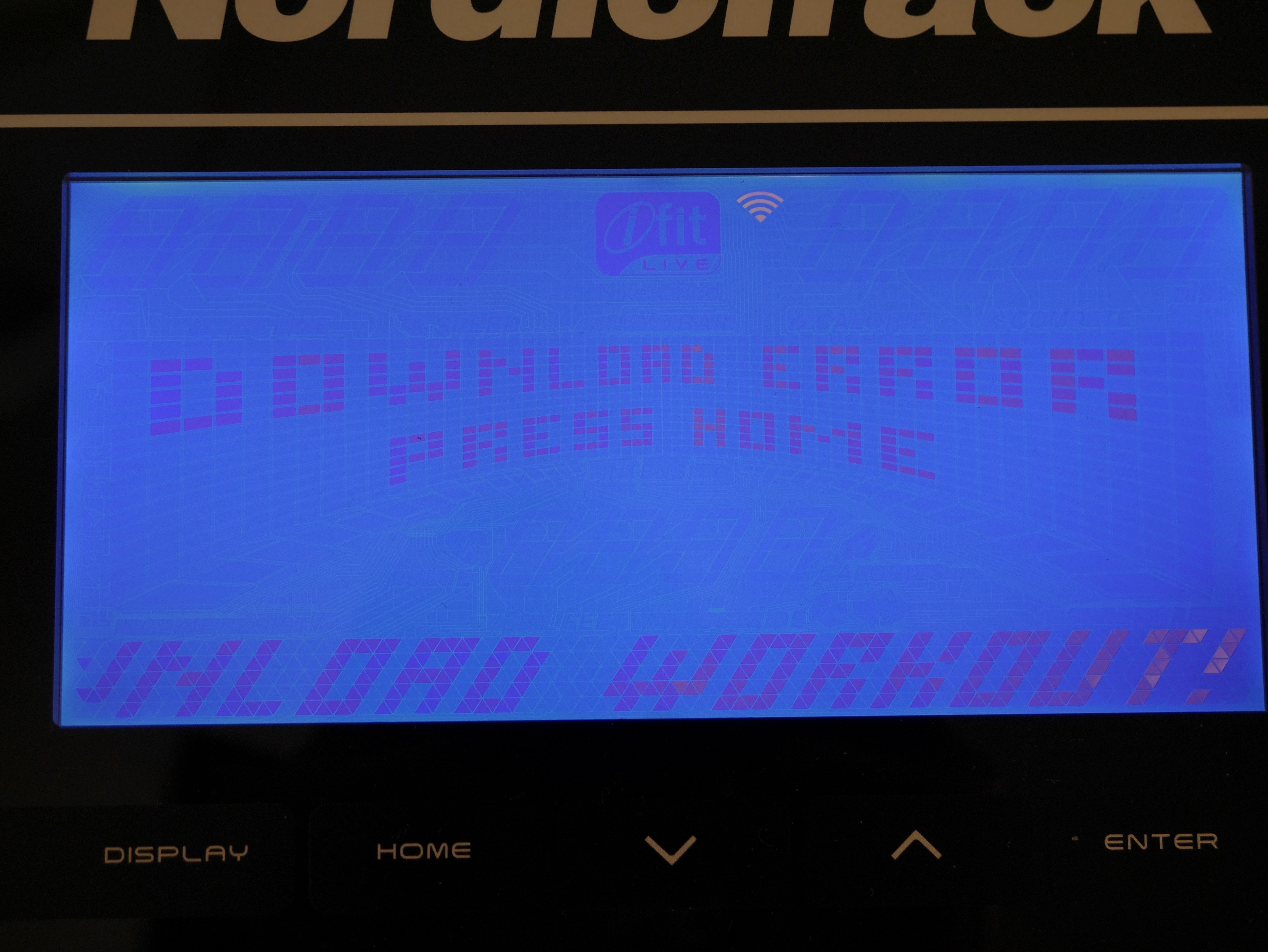
I have not yet been able to access anything other than the first two workouts scheduled for the day.
Finally, when I run a LiveView workout, the achievements of the workout are not updated on my Control Panel:

Notice that I just have completed a 39-minute workout, but my dashboard total time is 11 minutes and I just burned 225 calories, not the 57 that are shown. And yes, I have a 60 Mbps Internet connection and a fast WiFi, and I have waited 15 minutes for the update. (The day after's update [after another workout] shows the same 11:24 time, but now I have burned 62 calories and gone 72 feet in elevation.) Manually entering logs is just too painful to contemplate.
I think that part of the problem is that unless you go to the iFit Web site and shuffle the order of today's workouts in the s l o w calendar, it is impossible to know which workout iFit is going to download when yopu press the iFit button. If you choose the first workout, the registration of your time seems to work. But if you want to run a different workout, and press stop, and then, say, the Map key (to run a Google LiveVierw workout), iFit does not know you have switched workouts and ignores your efforts. This is surely a bug! Any properly designed software would display the workouts and let you pick from among them.
More investigation reveals that iFit only records the first workout you select. For example, I started the Arcadia workout, and by accident removed the key. When this happens, you can restart, but not resume the workout (a real problem because it is easy to pull oput the key with your hand). Even though I hit Home many times to get back to the screen with my name on it, when I then hit the iFit button, and downloaded a new workout (in the Tyrolean Alps), this new workout was NOT recorded by iFit. Since it always takes me several starts before everything is working, none of the workouts that I actually run are recorded. All the initially-selected workouts (that I terminated) are recorded. This is a serious bug.
This software is just plain broken and badly designed, and iFit should refund membership fees until it is fixed. Their raison d'être is that they provide individualized advice to guide you towards getting fit. Clearly this is impossible if they do not have my workout data!
Saturday Dec. 14: Grrr...
It has been a month now that I have had the C1570Pro. Although I have been in touch with the iFit product manager, Matt Evans, he has been unable to get a console to test. Other owners of this model have reported the same problem: completed workouts are not registered on the iFit Web site.
But this morning, the console broke completely. Only the Speed=6 button will do anything. While IconFitness has agreed to replace the console under warranty, they refuse to pay for labor. According to NordicTrack, the labor coverage does not cover things that I installed— such as the console. Here is the warranty:

I defy anyone to read this and interpret the warranty as excluding labor on anything. They also called me on the phone to buy an extended warranty, and told me that there would be no labor charge on anything. THE LABOR RESTRICTIONS CONSTITUTES A BREACH OF CONTRACT.
Other infelicities
- You can't tell the units in which time is displayed, both on iFit and the console. Is the first field hours? days? minutes? On the console, it seems to change at 60 minutes.
- It is unclear how altitude gain or loss is calculated. Is it from the Google terrain or does it take into account the -3–15 range of the device?
- The console seems to display the net height of the workout. (I have no idea what the iFit site displays because it records nothiong for me.) If it were an accurate measure, it would always be 0 at the end of a round-trip workout, and thus useless. There is room on the console to display the up and down altitudes separately, whioch would be useful.
- The iFit Web site is still much too slow. It usually takes 3–5 minutes to get the iFit display on my tablet, which means I miss the view on the start of the workout.
Monday Dec. 16:
I really wanted to work out again today, so I pressed the Speed=6 button many times and lo and behold, the console sprung to life. So I started an iFit workout. It took me over 4 minutes to get the LiveView pictures displayed on my tablet. Most of this time was spent getting the link to LiveView to display, and then to do something when I pressed it. Most things on the iFit Web pages take much too long to appear. Instead of the advertised "New Look," iFit needs to fix the speed of their back-end servers.
But part-way through the workout, the speed '–' key stopped working (a safety hazard). I hopped on the side rails and pressed '6' multiple times, and things came back to life. But clearly the console still needs replacing. These keys are both hard to press and unreliable.
I wonder how iFit picks the workout of the day? Many of them are just a road and trees—kind of boring. I did the British Columbia workout today and was disappointed. The Taiwan workout was also just road and trees, and not even pretty trees.
Saturday I sent an e-mail to cs@iconfitness.com labeled "Attn: Office of the President" with a link to this blog and the copy of the warranty. This afternoon I received a response:
Customer is under his manufactures warranty. Please contact customer to assist them.
and shortly thereafter, a repair order went out. Of course, a replacement console is still out of stock. So, do not let the phone representatives try to tell you that some labor is excluded. However, if it was a simple part, I would certainly replace it myself.
Tuesday Dec. 17:
Things were much better today. I had left my browser in yesterday's LiveView mode, and it automatically switched to today's tour of Venice—the most interesting iFit tour yet. And the LiveView beta served up images every 5 seconds, or even faster. I definitely recommend walking the canals of Venice.
But this time I decided to register my workout (1 hour, 3.2 miles, about 300 calories as per the console) manually. Something is very wrong however. There is no place to register the vertical ascent/descent. Surely the calories burned depend upon whether the workout is uphill or downhill! It claimed I burned 791 calories in an hour, which I think is quite impossible. It also points out the problem with keeping a running total of the vertical feet. The total is unrelated to the calories burned. You need the separate up feet and down feet, perhaps as a function of time.
Maybe when my console starts reporting the workout to the iFit Web site this will be fixed?
Saturday Jan. 4:
Letter to iFit product manager/IconFitness President:
My treadmill is totally dead yet again.
Today, nothing worked properly, either online or on the console.
- I could only get yesterday's workout.
- Track button presented me with some old ones that were not able to load.
- I turned off the power
- Got into setup mode and pressed home a zillion times (why is the login which you have to do every time after the wifi setups??) to get to login
- It logged me into someone else's account without doing a token. Security Issue--you have none basically.
- I turned it off again and repeated above. I got a token
- Token would not be accepted on my tablet browser. Not clear what to hit after entering token. Is Connect a button? It should be AFTER the token entry.
- Went upstairs and did token on my Mac, which was accepted.
- Console loaded proper workout.
- Started workout. Got to speed 3.
- Found that all keys were dead except for speed=6 (as happened before).
- Incidentally, pressing 6 twice quickly sets it to 6.6 mph
- Very dangerous. Only way to stop is with the key. This has to get a higher priority. I still have not gotten a new console, and guess you have not either! It has been on order since Dec 14 for me, and for you longer.
- Now have DEAD treadmill for the second time unless it decides to fix itself.
Thursday Jan. 16:
Still no word on when I get a new console!
Wednesday Jan. 29:
Still no word on when I get a new console!
Monday Feb 24:
NordicTrack claims that their supplier was supposed to deliver by the end of January. Still no console. What ever happened to the idea of second sourcing all supply chain items?? I had a torn meniscus repaired in my knee and bought this behemoth for rehabilitation. And there it sits, taking up most of my floor space. I can't fold it up because the elevation is not at 0.
Monday March 3 17:
Still no sign of a console.
Tuesday March 18: Resolved!!!!!!!!!!!
Finally NordicTrack has agreed to take my C1570 back, and they are replacing it with a newer C1630 Pro. The e-mail address I gave above seemed to do the trick. And they are providing white glove service for the swap. Provided the new machine works properly, I shall be a happy camper.
Friday March 28:
I finally received the new C1630Pro treadmill. It is essentially identical to the old one. NordicTrack could have just sent me the console from this model. As it was, it was a royal pain to box it up because the boxes they sent were a tad too small, and no one locally sells packing tape wider than 1.5". I assembled the unit myself and had it up and going Saturday. A hint to those assembling this model: You can attach the bars holding the console before plugging in the wires. This takes just one person to do. Then prop the console up with one of the yet-to-be assembled arm pieces, and you can easily plug in the wires.
This time, the packaging seemed to be improved and nothing was broken upon arrival.
However, iFit still does not return workout information to iFit. I did finally get a definitive answer from iFit (5 months after the fact):
Kyle Anderson, Mar 31 08:13 AM:
James,
Thank you for contacting ifit support. Your console is what is called the nuvaton console. This type of console right now is temporarily having issues with contacting the ifit server. I do apologize for this error that is on our side but your console is working correctly it is on our side that the error is occurring. I tell you this to ensure you that we are aware of the issue and that it is getting worked on currently to get it resolved. I want you to know that when you console does start working correctly I will credit your account so that you do not miss out on any downtime that you have experienced. This is a temporary error and we will have it resolved in a timely manner, thank you for understanding.
Kyle Anderson
iFit Customer Care
1-866-608-1798
What is an iFit workout like?
Now that the treadmill is mostly working, I thought I would show you how to do an iFit Live View workout.
[video:http://youtu.be/pF9DG6Gg-b8]
Freddy Jones, May 19 07:26 AM:
James,
I fully understand that this is your issue, and what i'm trying to do is ensure that there is nothing further that we can do. As of right now, we are approaching a fix with the Nuvoton Console issue, and appreciate your patience with us. I ensure contact between the Software Development Department and I remains eminent as we approach the fix. If you wish to cease troubleshooting, we may do so until I get further word on a fix. I apologize once again for this issue, and would be more than happy to reimburse you via a free workout from the Fitness Shop, or by adding the downtime to your iFit Account.
Freddy Jones
iFit Customer Care
1-866-608-1798
They must have the worst software developers on the planet. It has been 6 months now. I could have rewritten the code from scratch in a week. Furthermore, NordicTrack should not be selling products that are known to not work!
Still not fixed as of July 23, 2014.... September 18, 2014
Still not fixed on Christmas Eve.
Jamesrome, Dec 23 02:30 PM:
It is over a YEAR now, and my iFit workouts are still not recorded to
your site.
There is no excuse for this!
The fix was "in testing" 6 months ago.
Freddy Jones, Dec 24 07:11 AM:
I understand this, but I am doing all I can do for you at this point. I am in direct communication with our Software Development Department, and I assure you that if I had anymore information than this, it would be given to you. I sincerely apologize for the longevity of the issue, and I am certainly just as frustrated as you are. I can offer as much downtime as you need at this point, to try to compensate for the waiting you've had to do.
Freddy Jones
iFit Customer Care
1-866-608-1798
It seems fixed!!!!
Freddy contacted me to say that there were updates for my treadmill. I applied them and tried it today, and finally, the iFit site registers my workout. At first I thought it was wrong, since it said I had climbed 21,000 feet today (and I would be dead for sure...) but it added all my previous workouts to today. When I listed them individually, they were correct.
Update September 24, 2015
I spent the summer swimming 1250 yards a day. But the pool closed, so I went back to use my treadmill and iFit again. I checked for firmware updates—there were none. I started my workout, and the doorbell rang. I hit the Stop button to go answer the door. When I returned, the iFit workout continued from the spot I had left it! This is a great advance in their software, and the subject of most of their support requests (I believe).
But there is still a big issue about altitude and how it is defined.

As you can see, I have died after climbing 1695 feet in 50 minutes at a speed of about 2.5 mph.
iFit must come clean about how they calculate the altitude. Several issues exist:
- The route slope may (and usually does) exceed the range of your machine. You can tell this is happening when the machine is at maximum or minimum slope, and there is a beep, and nothing happens. So what slope does iFit use—the machine slope or the program slope?
- The treadmill altitude reading is of course useless because it gives the net altitude gain (subject to the above uncerttainty issue). It would be easy for NordicTrak to change the firmware to only count uphill gains.
- Is iFit correctly recording the altitude from the treadmill?
"Onboard Programs" configuration misrepresentation
I have a nordicktrack…
Nordictrack ifit software is junk
Disgusted with NordicTrack
Coach subscription issues!
iFit and iRunmaps are a powerful combo
No WiFi
You will need to call iFit…
You will need to call iFit about this.
Add new comment